
What Is Cable Burn-In? An Honest Guide to Audio Cables, Speakers and Proburn - cable burn-in accelerator:

AI-generated image, for educational purposes only.
30 September 2026 · By Vihang VASA, Photonics Enterprise, Mumbai
I get asked about burn-in very often. Some swear by it. Some think it is pure marketing. The truth sits in between, and it depends on what you are talking about. So let me separate what we can measure from what is claimed, and you can decide for yourself.
◆ Part 1 — What is burn-in?
"Burn-in" (also called break-in, run-in, conditioning; all mean the same thing) is the idea that a new audio component sounds better after it has been used for some time. People describe new gear as a little hard, tight or closed-in, and burned-in gear as more open, relaxed and natural.
For a speaker, burn-in has a clear mechanical cause: moving parts loosen up with use. For a audio cable, there are no moving parts. Any change would have to come from the metal, the insulation (the "dielectric") or the connectors. That is where the debate starts.

AI-generated image, for educational purposes only.
◆ Why audio cable burn-in matters, and what it is said to do
It matters because you have paid for good audio cables and want them performing at their best from day one. Many experienced listeners, report that new cables settle in over the first few weeks.
The usual explanations given are:
· The dielectric settles. Insulation materials such as PTFE, polyethylene or PVC can hold a small electrical charge. The theory is that a fresh audio cable carries stress and static from manufacturing, and that signal passing through it helps this settle.
· Connectors bed in. New plugs and sockets have microscopic high spots. With use and re-plugging, contact surfaces connect better. This part is physically plausible and easy to check: clean and re-seat your connectors.
· The ear settles. Our hearing adapts to a new sound within a few days. Some of what we call burn-in is our brain getting used to a change.
Many experienced listeners hear it clearly. So the best judge is your own system and your own ears.
◆Can you reverse a audio cable's direction? Normal vs spiral audio cables
If your audio cable has an arrow, follow it. To understand why, it helps to look inside the audio cable. A good audio cable is not just two wires; it’s very precise electrical engineering. It is built in layers, and each layer has its own job.
◆ What is inside a good audio cable
From the centre outwards:
• Stranded conductors. Each conductor is made of many fine copper / silver strands bundled together, sometimes lightly twisted. This keeps the audio cable flexible and stops it cracking when it is bent. This inner spinning of the strands has a different job from the spiral of the pair. Both are explained below.
• Insulation. Each conductor has its own insulating jacket (the dielectric), so the two never touch.
• The twisted pair, or spiral. The two insulated conductors are wound around each other along the whole length of the audio cable. This is the spiral you see in a spiral audio cable, and it is the first line of defence against hum.
• The shield. A woven braid of fine wires, and sometimes a foil, wraps around the twisted pair. This is the second line of defence.
• The outer jacket. It protects everything inside.

AI-generated image, for educational purposes only.
◆ The strands and the audio cable's own magnetic field
Whenever current flows through a wire, it creates its own magnetic field around that wire. Music is no exception. As the signal flows, every conductor in the audio cable is wrapped in its own small, constantly changing magnetic field. This field does not simply disappear. It acts back on the current that created it. Every time the music changes, the field resists that change for a split moment. Electrical engineers call this inductance. In long speaker cable runs, too much of it can gently soften the fastest, finest details at the top of the range. Shorter the audio cable, better its performance.
Good audio cable design keeps the audio cable's own field under control in two ways:
• The spiral of the pair. The music signal goes out along one conductor and comes back along the other. Their magnetic fields point in opposite directions. When the two conductors are twisted tightly together, these fields largely cancel each other out. This lowers the audio cable's inductance, and it also means the audio cable sends less of its own field into the audio cables next to it.
• The spinning of the strands. At higher frequencies, a conductor's own magnetic field pushes the current towards the outer surface of the wire. This is called the skin effect. Spinning many fine strands together gives the current more surface to travel on. In the finest designs, known as Litz construction, each strand is individually insulated and woven so it takes turns being on the inside and on the outside. That way, every strand carries its fair share of the current. To be fair about it, in copper / silver at audio frequencies the skin effect is small. It matters most in thick conductors and long runs. But it is one of the reasons serious audio cable makers care so much about how the strands are spun, not just how much copper / silver goes into the cable.
◆ How the twist cancels interference
Your home is full of electrical noise. Mains wiring, transformers, dimmers and power supplies all create a changing magnetic field around them. When that field passes through a loop of wire, it pushes a small unwanted voltage into it. In an audio cable, that unwanted voltage is heard as hum. Now look at a twisted pair closely. Every twist forms a small loop. Each loop is flipped compared to the one next to it. So when interference passes through the audio cable, it pushes one way in the first loop and the opposite way in the next loop. Loop after loop, the unwanted pickup largely cancels itself out along the length of the audio cable. The wires are not spinning the noise away. It is the geometry of the twist that does the work. The tighter and more even the twist, the better the cancellation. It works best with balanced (XLR) connections, where the equipment at the receiving end also rejects any noise that appears equally on both wires.
◆ What the shield does
The twist handles magnetic hum. The shield handles a different kind of noise: electrical and radio-frequency interference from mobile phones, Wi-Fi routers, dimmers and switching power supplies. The braid catches this noise before it reaches the signal wires and carries it away to ground.
A shield only works when it is connected to ground. Many audio cable designers connect it at one end only. This avoids a ground loop, which is a common cause of hum when two pieces of equipment are both grounded through the same audio cable.
◆ So, does direction matter?
Here is how each layer behaves if you turn the audio cable around:
• Stranded conductors: no difference.
• The twist: no difference. The twist cancels interference the same way from either end.
• The shield, connected at one end only: this is where direction matters. The designer chooses which end is grounded, and the arrow makes sure that end goes to the right piece of equipment. Reverse the audio cable, and the shield is grounded at the wrong end. The noise may no longer drain away as intended, and you may hear more hum or hiss.
• Manufacturer's run-in: some brands also mark the direction in which the audio cable was run in at the factory. If you believe in audio cable burn-in, keep it that way. It costs you nothing. My advice: if there is an arrow, follow it. If there is none, direction does not matter.

AI-generated image, for educational purposes only.
◆Does burn-in apply only to speaker cables?
The burn-in idea is applied to every audio cable in a system. The physics, though, is very different from one type to the next.
Audio cable type | What it carries | Burn-in: the honest view |
Speaker cable | Analogue music at high current, from amplifier to speaker | The most common place people report burn-in. The dielectric and connector arguments apply. Widely reported by experienced listeners. Best judged in your own system. |
Interconnects (RCA / XLR) | Analogue music at very low current and higher voltage | Same arguments as speaker cable. Shielding and grounding matter far more than burn-in. Best judged in your own system. |
Audio network (Ethernet) | Digital data in packets, with error checking | The data arrives correct or is resent. Burn-in cannot change bits. What can matter is electrical noise travelling along the audio cable, and that does not change with age. Best judged in your own system. |
Audio USB | Digital audio data plus 5 V power and ground | The bits are almost always delivered intact. Noise on the power and ground lines can affect a DAC, but that is a design and isolation issue, not burn-in. Best judged in your own system. |
Audio Power cable | Mains power at 230 V, 50 Hz, often several amps, all day | Carries far more current than any music signal, non-stop. If current-driven. a audio power cable would finish burn in faster then any other audio cable. Best judged in your own system. |
For digital audio cables, my recommendation is simple: choose good construction, good shielding and good connectors. Do not expect them to change over time.
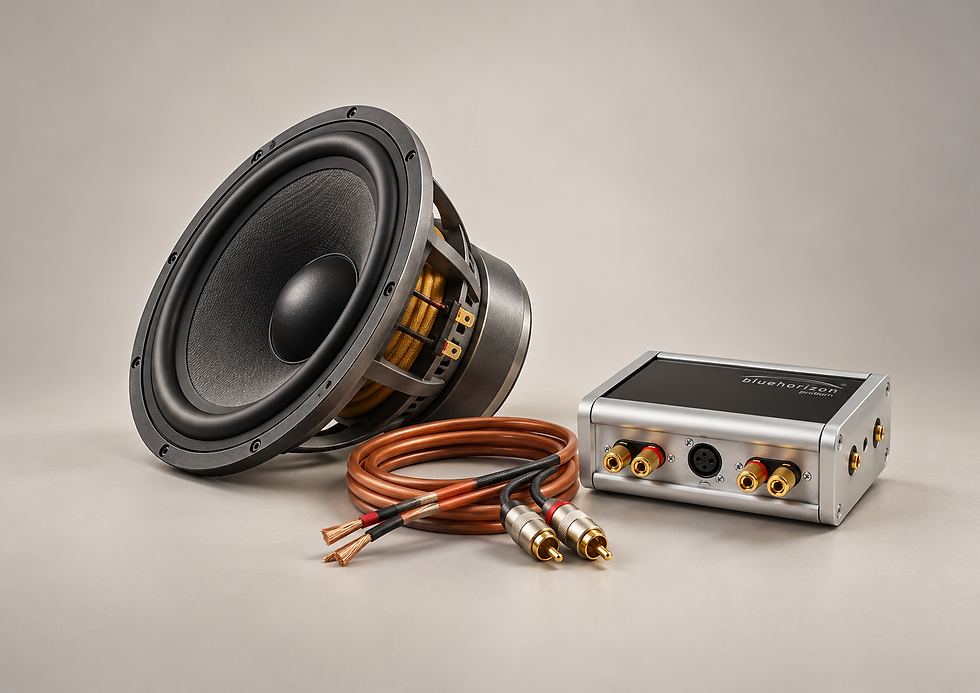
AI-generated image, for educational purposes only.
◆ Speaker burn-in: the part that is real
Speaker burn-in has a clear, measurable cause. A speaker driver has moving parts: the cone is held in place by a rubber or foam surround at the front and a fabric spider at the back. When new, these are stiff. As the driver moves, they become more flexible.
What changes:
· The driver's resonant frequency drops. A looser suspension lets the cone move more freely, so it resonates a little lower. Measurements show this clearly.
· Bass can become a little fuller and smoother, especially in woofers.
· Most of the change happens early. The biggest shift comes in the first hours of use. After that, the change becomes small.
· Some of it comes back. Leave a speaker unused for a while and the suspension stiffens slightly again, then loosens once you play it.
Tweeters and compression drivers move very little, so they change far less than woofers. Electronics such as amplifiers and DACs also settle thermally when switched on, but that is warm-up, which happens every session in minutes, not burn-in.
◆How long does burn-in take under normal use?
There is no official number. Manufacturers quote anything from 50 to 500 hours. Here is my person experience:
Item | Commonly quoted | What the evidence supports |
Speakers (woofers) | ~50–200 hours | Most change within the first several hours to a day or two of normal listening. Small refinements after that. |
Speakers (tweeters) | ~20–100 hours | Very little mechanical change to begin with. |
Speaker cables and interconnects | ~100–400 hours | A few weeks of normal listening, or 24–48 hours on Proburn, as Blue Horizon states. |
Audio digital and power cables | ~50–300 hours | No mechanism that would change the sound over time. |
The simple approach: just enjoy your system. Normal listening at normal volume does the job. There is no need to play loud test tones for days.
◆Are new audio cables and speakers already burned in?
Sometimes. Some speaker makers run their drivers during factory testing, which loosens them a little. Some audio cable brands say they run their cables in before shipping. Most do not state it either way, so ask your dealer or check the product documentation.
◆ What difference does burn-in make to sound quality?
Speakers: a real but modest change, mainly in the bass. Think of it as fine-tuning, not a transformation. A good speaker sounds good out of the box.
Audio Cables: listeners describe a more open, relaxed and three-dimensional sound. I respect those experiences, and I have heard clients describe them. I won't make promises on paper. I would rather you hear it. Listen to your audio cables before and after Proburn, in your own system, and decide for yourself.
Finally, one thing that is proven: system matching, room placement, clean power and good connections make a much bigger difference than burn-in ever will. That is where I would spend your attention first.

AI-generated image, for educational purposes only.
◆ Part 2 — What does Proburn - Audio cable burn-in accelerator do?
Proburn is a dedicated audio cable burn-in unit from Blue Horizon, a UK company founded by audio designer Keith Martin. Instead of playing music through your system for weeks, you connect your cables directly to Proburn and let it run.
Manufacturer's product page: Blue Horizon Proburn
How it works, according to Blue Horizon:
· It feeds audio cables a specially generated signal containing both very low and very high frequencies, far wider than music or a CD can produce.
· The aim is to condition both the conductor and the insulation around it, and to clear static charge left from manufacturing.
· Blue Horizon states that a new audio cable is fully burned in within 24 to 48 hours.
· For audio cables already in use, they recommend a 24-hour session every six to eight weeks to keep them at their best.
What you can connect:
· Speaker cables, on gold-plated binding posts
· RCA interconnects
· XLR balanced interconnects
Key details:
Specification | Detail |
Housing | Solid aluminium and Perspex |
Power | Universal 5 V DC adaptor, 90–264 V AC input |
Size | 170 × 70 × 105 mm (L × H × W) |
Weight | About 1 kg |
Why I offer it. Proburn is safe for your audio cables and runs on its own, away from your system. It saves your amplifier and speakers the long hours of burn-in play. And if you are one of the many listeners who hear a difference after burn-in, it gets you there in a day or two instead of weeks. I would rather you try it and judge with your own ears than take anyone's word for it, including mine.
◆Your Audio Cable and Speaker Conditioning Specialist
Technology is only as good as the team that deploys it. Photonics Enterprise is an experienced Audio & Video specialist based in Mumbai, providing professional site surveys, planning and installation tailored to your premises. We offer rapid on-site support, training and ongoing post-sale monitoring, with a direct escalation channel to the respective brands.
Proburn - Audio cable burn-in accelerator is available through Photonics Enterprise.
Part of the Photonics Enterprise culture is to share knowledge openly with interested and like-minded people, to build new relationships, and to evolve together. If anything in this guide raised a question, we would be glad to talk it through.
To arrange a demonstration or a conversation, please get in touch with Photonics Enterprise.
Vihang VASA
Founder, Photonics Enterprise — Mumbai
+91 98200 29063 · info@photonicsenterprise.com


Comments